DeSlop
Userscript and browser extension for filtering out AI slop from your YouTube feed. Blocklist-driven.
Description
Fetches a blocklist from GitHub and removes any and all videos from your feed that matches any entry on that list. Removes videos from Home and Subscriptions, and both videos and channels from Search.
Channels that publish fully AI-generated content as well as channels that promote or teach how to create it qualify as AI slop, and will therefore be blocked.
As a cherry on top, I think YouTube still counts you as having technically “seen” the videos in your feed, but decided not to click them. Which should negatively impact the slop creators’ click-through rates, all in the background, which is good.
Contributions to the blocklist are welcome!
Installation
The functionality is identical across all mediums.
Firefox
YouTube DeSlop can be installed as A Firefox Add-on.
Chromium
You can add YouTube DeSlop as a local extension to Chromium, a directory is provided for it in /chromium/.
- Download the zip file and extract it anywhere.
- Go to
chrome://extensions/ - Enable Developer Mode in the top-right corner.
- Click Load unpacked from the newly appeared bar.
- Navigate to the extension folder and confirm.
- Folder, not the zip file.
- Done!
Note
DeSlop will not be on the Chrome Web Store.
I’m not doing Google’s age verification and paying the fee just to get denied because they love AI slop.
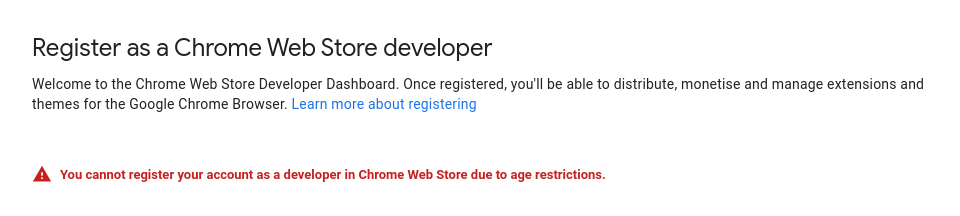
Edge Add-ons or Brave Browser Extensions are not entirely out of the question, for now.
Userscript
- Install your favorite userscript manager.
- (Violentmonkey for Firefox/Tampermonkey for Chromium).
- On Chromium, make sure Tampermonkey can actually run userscripts:
- Go to
chrome://extensions/ - Click Details under Tampermonkey
- Enable “Allow access to file URLs”, “Allow User Scripts” and “Developer Mode”, then hit “Update”
- Go to
- Click the install link and install when prompted.
- Done!
Blocklist
[!WARNING] The list is incomplete! Your help is much appreciated!
The blocklist can be found in /block/list.txt.
Reporting Channels
There are multiple ways to report channels.
Submit a Pull Request
This is the easiest on the back-end. You can follow these steps:
- Fork the repository.
- Go to the GitHub Repository and click Fork in the top-right corner.
- This creates a copy of the repository under your own GitHub account, which you can edit freely.
- Modify the blocklist.
- Locate the
/block/list.txtfile in your forked repository. - There is a GUIDE at the top of the blocklist file.
- Submit a pull request.
- Step 1. Go to the pulls page.
- Step 2. ???
- Step 3. Profit
If you’re seeing this, step 3 is a work in progress.
Open an Issue
You can also open an issue, where you link the channel(s) that should be blocked. There will be an issue template you can use.
Email me at my support email and I will add the channel manually.
- Preferably a channel link in this case.
- Your email will not be used for anything, ever.
- Feel free to use any throwaway email, I don’t care.
Google Forms
Google Forms for anonymous submissions coming soon!
Social Medias
You will also be able to contact me on any social media platform. Links coming soon!
Entry Appeals
See an entry that shouldn’t be there? Submit a report.
File Structure
.
├── assets
│   └── *
│
├── block
│   ├── list.txt
│   ├── parse
│   └── sort
│
├── chromium
│   └── x.x
│       ├── icons
│       │   └── icon.svg
│       ├── x.x.zip
│       ├── deslop-bg.js
│       ├── deslop.js
│       └── manifest.json
│
├── firefox
│   └── x.x
│       ├── icons
│       │   └── icon.svg
│       ├── x.x.zip
│       ├── deslop-bg.js
│       ├── deslop.js
│       ├── manifest.json
│       └── youtube_deslop.x.x.xpi
│
├── userscript
│   ├── .old
│   │   └── x.x.user.js
│   └── deslop.user.js
│
├── LICENSE
└── README.md

35 directories, 89 files
Contributing
Feel free to fork this repository and submit issues or pull requests if you have any suggestions or improvements. If you encounter any bugs or have feature requests, please open an issue.
Credits
Created by Nikoboi
Massive thank you to Link Gopher, which allows me to yoink all YouTube links from sites very easily.
The following websites provided very convenient blocklists:
- Honorable mention:
- FeedSpot, providing 76 channels!
- Adequate mentions:
- Analytics Vidhya, 12 channels.
- Your Dream AI, 11 channels.
- Useful AI, 7 channels.
- Awisee, 5 channels.
- DEV.to, 21 channels.
Dishonorable mention:
- YouTube, for not marking AI slop (-_-)
License
This project is licensed under the GNU General Public License V3. See LICENSE for details.